Searching the Web with agents

This is the first part of a short series about Web searching / crawling. The second part is available here: On AI-assisted Web Search.
If you ever read about PowerBrowsing or, more recently, my vibe reversing post, you probably realised I am a Web junkie. I was a Web 1.0 lover, a Social Web enthusiast (before it became, as Tom Eastman wrote and Cory Doctorow referenced, five websites, each consisting of screenshots of text from the other four), then a Semantic Web researcher, and, since the AI slop era, a Web 1.0 mourner (no wonder I opened my own gopherhole a few years ago).
This is half of the reasons why I wrote this post, which is aimed at teaching you how you can build a very simple Web search agent, using a bunch of tools you might have already heard about: Pi, SearXNG, and llamafile. The other half relates to another thing I care a lot about, which is ownership of the tech you use.
You must ride this bike
My grandpa taught me how to ride a bike. Whenever he saw me struggling, he used to tell me: “you must ride the bicycle, not the other way around!”. This thought always stayed with me, as I found it could be applied to so many use cases aside from biking.
With the evolution of the Web as a platform where people could not just passively consume, but also easily produce content (no wonder the term Read/Write Web was used to describe it), I could immediately tell that, very much like a bike, that was a technology supposed to be driven by people, not the other way around. The thing is, the general way it has been (and currently is) used is as a TV-on-steroids… Where steroids amplify its offering, but also the effects it has on us.

(image taken from Ovid’s riddle on 3564020356.org, September 2001)
I don’t think one needs to be a content producer to use the Web without being a passive spectator. From Searchlores times, Web search has been taught as a way to actively seek knowledge, and for this very reason I decided to write about it now. Some might object that delegating our choices and activities to an agent might make us, once more, passive. I agree in principle, which is why I will focus on making sure there is enough building and choices to keep your hands (and brains) busy.
If at this point you’d rather skim a plain list of commands instead of reading more of my thoughts, the original tutorial I wrote is on GitHub. What follows is basically the same recipe, with a bit more why baked in… Because I think it’s at least as important as the how.
Anatomy of a search agent
Regardless of their power and complexity, AI agents are usually built from the same five primitives:
- A model (LLM) that, given your input message and a list of tools it can use to answer it, generates a response for you.
- A set of tools, i.e. named, typed, callable functions that the model can invoke.
- Some instructions (the system prompt) that tell the model what it is and what it is being used for.
- Some callback functions, that can take different roles, from plain observers to rewriters of what flows through the loop.
- A loop that alternates model and tool calls, until the model stops.
For this project, you will be using the following components:
Pi as the agent runtime. It provides you with the loop, the instructions, the callback functions, and a basic set of tools (plus a simple way to install more via plugins). I started using Pi last spring, that is quite recently, but I immediately fell in love with it. I like the bottom-up approach, where you start with a simple system and add only what you need to use. This is not just better for the LLM (its context does not explode in size due to a long list of tools you will never use) but also for me, as I can get a better sense of a model’s true capabilities. Another thing I love about Pi is trace management: I think the way I use it deserves a post of its own, for now just know that since I learned about the
/sharecommand I have been spamming everyone with traces of my experiments (and you won’t be spared either).SearXNG provides the search capabilities. Note that this is not just an agentic tool, but a standalone project that I think is worth your attention regardless of this post. It is a free (as in AGPL-3.0) metasearch engine which aggregates results from dozens of different services, without tracking or profiling. There are many SearXNG instances already available online (some running on Tor for increased anonymity), but for the sake of this project you will install your own: it’s simple, you can use it as your everyday search engine, and you won’t hit any of those free public endpoints with automatic requests. There are different ways to run SearXNG in Pi, here I chose to use the pi-searxng extension but if you like to tinker I’d suggest you to use Pi itself to write your own interface to SearXNG’s API.
llamafile provides the LLM. There are many alternative tools you could use here, but there are very good reasons why I am suggesting this one. First of all, this is a wonderful hack by Justine Tunney that IMHO deserves love just because of its existence. Then, I am currently working on it and this could be a great way to get more feedback (and possibly contributors 😬). More importantly, llamafile is heavily based on llama.cpp, which is a great inference server and a project I love. Last but not least, it comes as a single, self-contained, multiplatform file, which you (mostly) just download and run. Its goal is to lower the barrier to entry to the world of open source AI models and agents, and if anyone used it to get started and then got confident enough to move to llama.cpp, I’d consider my work a success. If you already use another inference server, just go ahead with it unless you are curious about llamafile. Just don’t use ollama 🙃.
Running SearXNG locally
The official docs have a Docker recipe, which boils down to the following few commands:
mkdir -p ./searxng/config/ ./searxng/data/
cd ./searxng/

docker run --name searxng -d \
    -p 8888:8080 \
    -v "./config/:/etc/searxng/" \
    -v "./data/:/var/cache/searxng/" \
    docker.io/searxng/searxng:latest
Open http://localhost:8888/ and you should see your shiny new search engine. Of course SearXNG can also be installed without docker, but I found this approach to be the simplest for me (and that’s exactly what I run on my home Raspberry Pi, which Firefox automatically points to every time I run a new search).
There’s one gotcha that took me longer than it should have: SearXNG ships with JSON output disabled by default, but JSON is exactly what the agent needs. This is one more reason why you should install your own SearXNG, as most public instances run with the default setting. To fix this, after the first run in docker, when the configuration files have been created, stop and remove the currently running container with docker stop searxng && docker rm searxng, then edit config/settings.yaml, find the formats: block, and make sure json is in there:
formats:
    - html
    - json
Finally, restart the container with the docker run ... command above and your SearXNG instance will be agent-ready.
Pi, talking to a llamafile
Pi has a few installation options; the one I found simplest is:
curl -fsSL https://pi.dev/install.sh | sh
Run pi once so it creates ~/.pi/agent/ with its tools and configs. Now you need to tell Pi to use llamafile as its model provider. Create a new ~/.pi/agent/models.json file and paste the following content inside it:
{
  "providers": {
     "llamafile": {
         "baseUrl": "http://localhost:8080/v1",
         "api": "openai-completions",
         "apiKey": "whatever",
         "compat": {
           "supportsDeveloperRole": false,
           "supportsReasoningEffort": false
         },
         "models": [
           { "id": "llamafile" }
        ]
     }
  }
}
A few notes:
- the
apiKeyvalue really is “whatever”: llamafile doesn’t care, but Pi insists on something being there - the configuration works with other openai-compatible servers too, in particular with llama.cpp without any modification (as that’s what llamafile is running under the hood).
- remember you’ll have to manually start a model manually before each Pi session! Depending on your inference server, there are different Pi extensions you can use to make this task simpler. I have created one called pi-llamafile that automatically starts/stops llamafiles and allows you to customize their configurations.
Now, download a llamafile and run it. llamafile’s documentation provides a selection of pre-built llamafiles to choose from, and the Quickstart page explains how to run one. The quickstart example suggests Qwen3.5 0.8B, one of the smallest available llamafiles, but I’d suggest you to try larger ones if you have enough resources available. For instance, I found Qwen3.5-9B a reasonable balance of “smart enough” and “this will fit in my RAM”. You can start it with the following command:
./Qwen3.5-9B-Q5_K_S.llamafile --server
The --server flag isn’t strictly necessary, but I like it during setup because the server logs every call hitting it, complete with token counts and tokens/sec. It’s genuinely useful for seeing what your agent is actually doing under the hood, as opposed to what you think it’s doing. When you run llamafile in server mode you won’t be able to access its TUI, but you can still connect to the llama.cpp Web UI at http://localhost:8080 to verify the server is up and running.
In another terminal, restart pi and type /model. You’ll find the newly configured llamafile model in the list, which points to your local server. Once you select it, start by asking a simple question:
What are your main features?
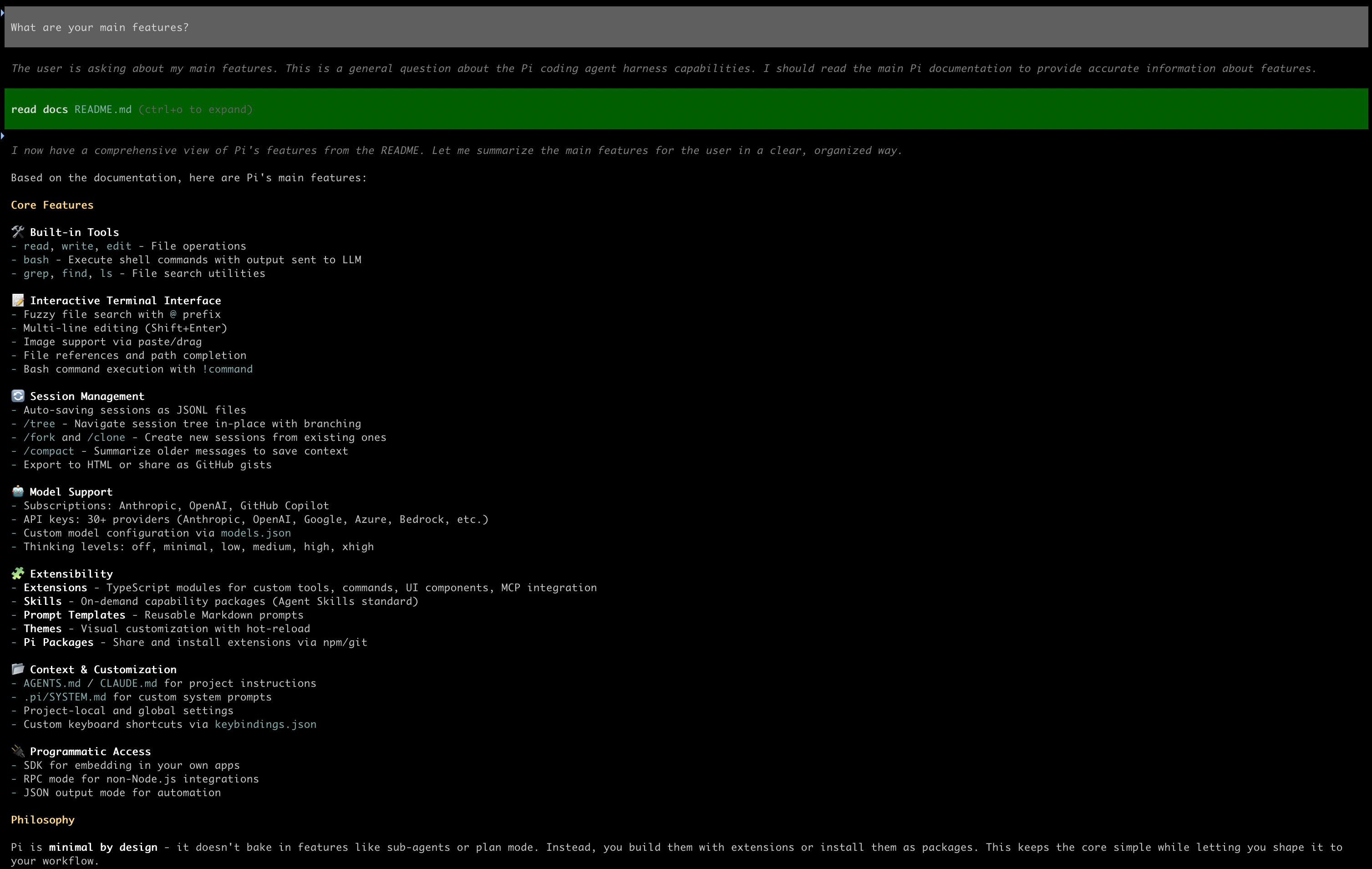
Pi has access to its own documentation and will happily call the local LLM to summarize it for you. This is also a nice sanity check: if this works, the agent <-> llamafile plumbing is fine.
Adding SearXNG to pi
If you look for SearXNG among Pi’s packages, you will find plenty of results (10 as of June 2026). The main reason why I chose pi-searxng is that it is quite minimal (in particular, it does not provide support for other search engines), but sometimes I think it is a bit too minimal, i.e. it hides part of the SearXNG API parameters that I feel would be useful. All of this to say: you might want to try some alternatives before you find the solution that works best for you, but this should get you started quickly. Installing the pi-searxng extension is as easy as:
pi install npm:pi-searxng
Then edit ~/.pi/searxng.json to add your server’s URL and parameters, for instance:
{
  "searxngUrl": "http://localhost:8888",
  "timeoutMs": 30000,
  "maxResults": 10
}
Now restart Pi and ask it something that actually needs the Web. The query I’ve been using to test this was:
Search the Web for 5 TV series to watch in 2026 and show me titles, descriptions, release date, streaming platforms, and the URLs you used as reference.
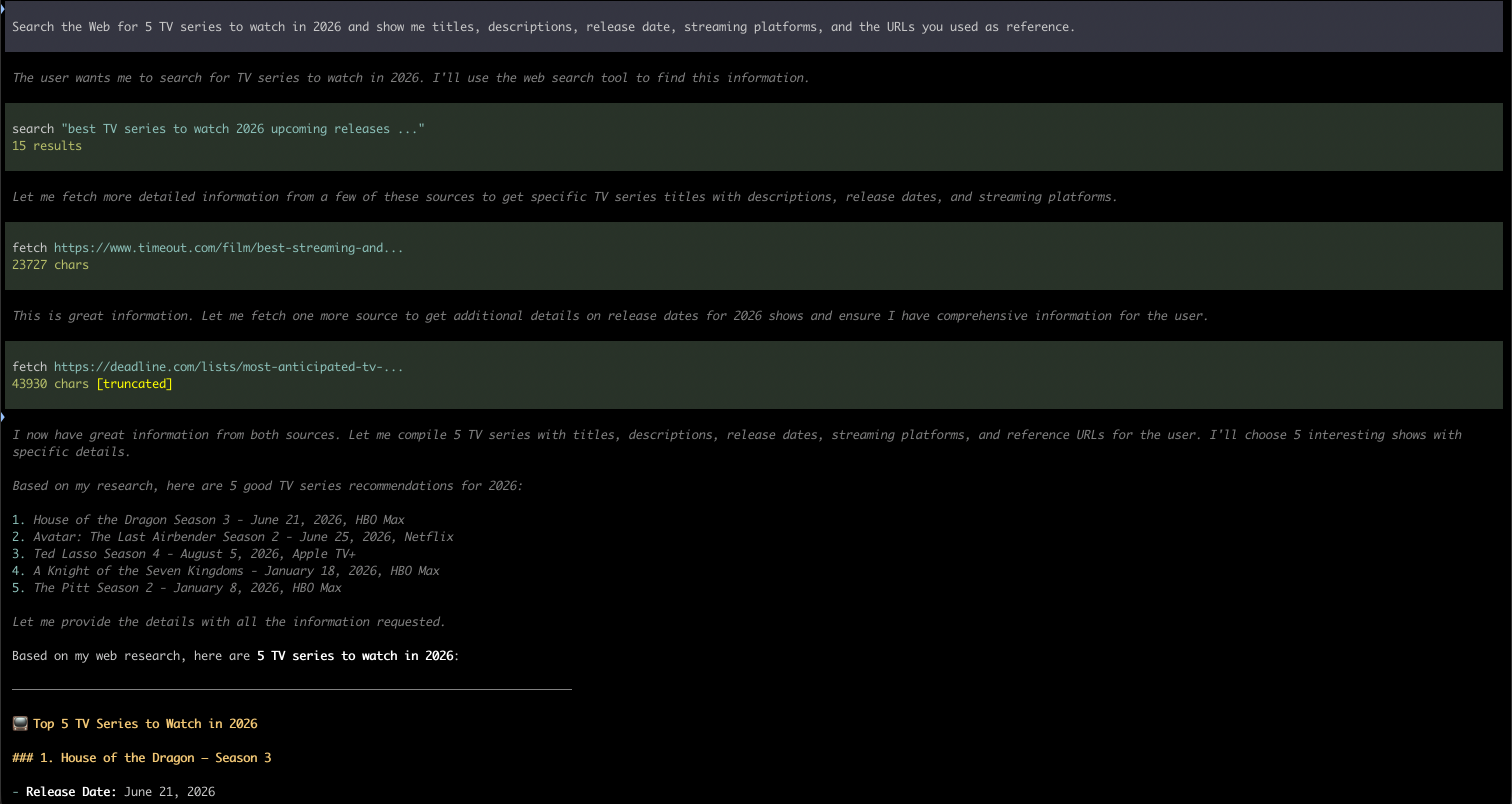
At this point, Pi will loop alternating tool calls (pi-searxng makes available a search tool to run Web search, and a fetch tool to download a Web page) and reading their outputs through the local LLM, autonomously deciding whether it has enough information or if it needs to dig further. A question like the one above will typically generate one or more search and a few fetches for the results that are considered relevant. You can follow what happens in real time, looking at the agent trace in Pi (see the figures below).
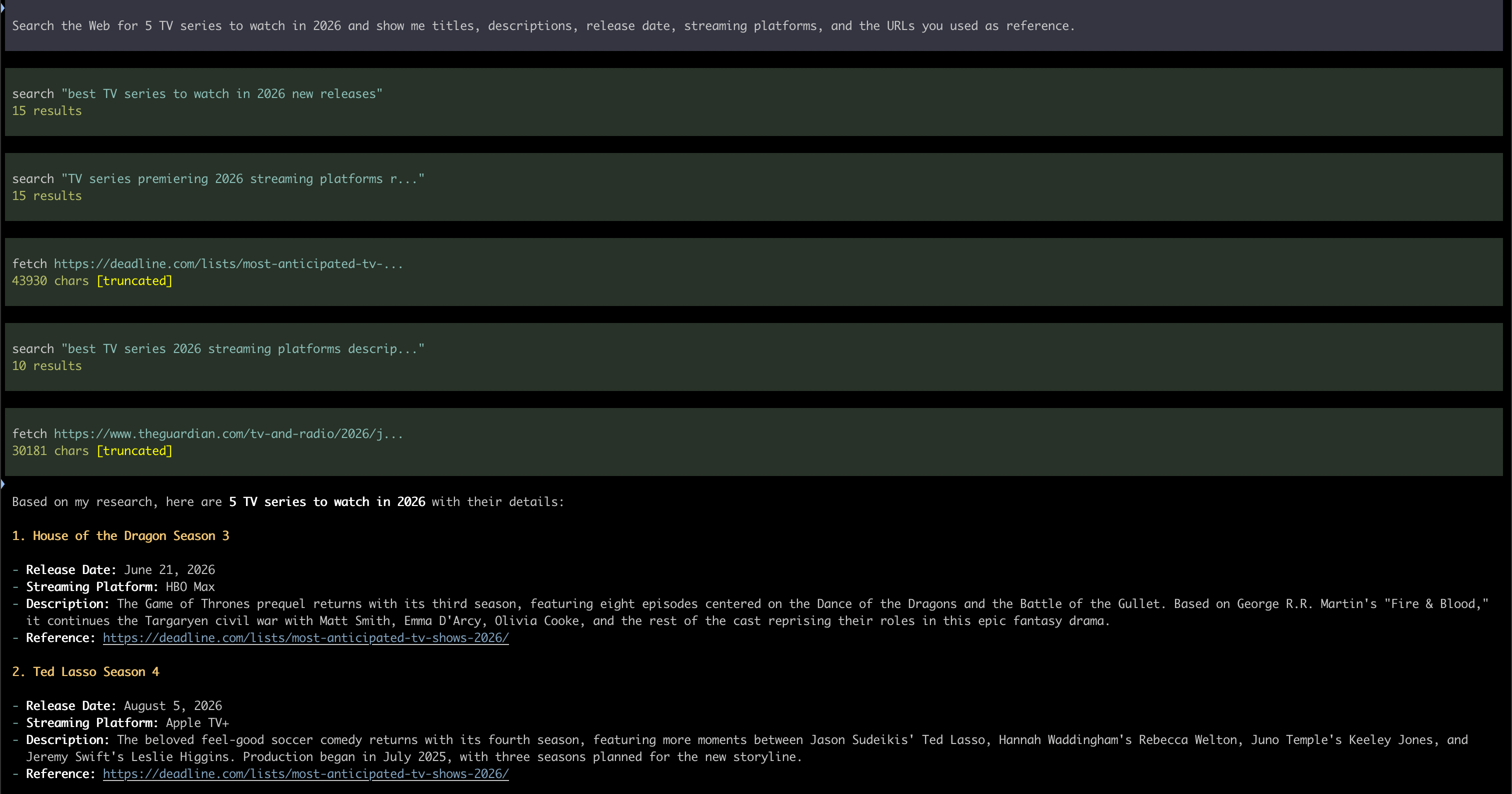
The previous image shows what you get when you run this with Qwen3.5:9B. The one that follows shows the output produced by Qwen3.6:27B, Note that this model has think mode on, so you can see it preparing your answer before actually writing it out for you. Aside from this the results are quite similar in terms of quality, but if you have the chance to run a variety of models then I suggest you to try them and see, for each kind of search, which one works best for you.
Is that it?
No. 🙃
This post covers the initial setup and first example, but there’s a lot more I would like to share. Did your search break with a context size error? Do you want to know what a larger model is capable of? What are the trade-offs you have to choose from when you own your search tool? But more importantly: what is the impact on the Web (and on your life) when search becomes automated? On AI-assisted Web Search contains a natural follow-up to this post, with more on customizing llamafiles, live examples, and considerations about AI-assisted Web Search.