Own your AI agent: running open source agents on your terms (3/3)
Based on a lecture given with David de la Iglesia Castro in early May 2026.
What you are reading is the written version of a lecture David and I gave on building and running AI agents that you own completely. It starts from the assumption that even if a commercial AI service is not inherently bad, depending on one for everything definitely is. After providing a way to compare commercial and open source AI systems more fairly, we walk through the primitives that every modern agent is built from. With a series of concrete experiments with local models and tools, we explain how open source agents work and where they fail. The argument throughout is that you don’t have to depend on closed, rented systems for everything — and that you learn a lot more when you don’t.
Given the length of the lecture I decided to split this post in three parts. You are currently reading the third one. Part 1 provides an introduction with motivations and background, part 2 walks you through the five primitives that most modern agents are built from, and this post presents a series of concrete experiments with local models and tools.
Know your tools
This post is about what happens when you actually run agents built as described in part 2. We will look at several things that go wrong, and several things that go right, with small local models.
We will move between code in C++, Python, JavaScript, and HTML, because the point is not which language to write an agent in: AI agents can easily translate between them for you. The point is to know what the main components are, and how they fit together.
My examples
Just a heads up about my examples: they are very, very, VERY simple. I understand that, in the world of coding agents, asking one single trivial question might sound naive. However, they are simple on purpose: their goal is to explain more complicated concepts, without adding further complexity themselves. Also, their effect is stronger when you see them failing on large, black-box, billion-dollar AI systems 😬.
A first run: counting Rs in StRawRbeRRRy
One of the demos in Mozilla’s wasm-agents-blueprint is a single HTML file that runs a Python agent in your browser via Pyodide. It connects to a local LLM server (llamafile, llama.cpp, LM Studio, Ollama, anything that speaks the OpenAI completions API) and exposes three tools: a character counter, a webpage fetcher, and a Tavily web search.
We use this WASM agent to run a classic test: how many times does the letter R occur in the word “strawberry”?, except misspelled (strawrberrry), so predicting from known tokens can’t help. While this sounds like an old, solved problem, there are still commercial models which are not able to answer this kind of question properly. For instance, gpt-4o-mini gets it right 3/10 times (but that should not surprise us, as the correctly spelled “strawberry” also gets the wrong count most times):
How many times does the letter r occur in the word strawrberrry?

Response #0: In the word "strawrberrry," the letter "r" occurs 4 times.
Response #1: In the word "strawrberrry," the letter "r" occurs 4 times.
Response #2: In the word "strawrberrry," the letter 'r' occurs 5 times.
Response #3: The letter "r" occurs 4 times in the word "strawrberrry."
Response #4: The letter "r" occurs 4 times in the word "strawrberrry."
Response #5: In the word "strawrberrry," the letter "r" occurs 5 times.
Response #6: In the word "strawrberrry," the letter "r" occurs 4 times.
Response #7: The word "strawrberrry" contains 5 occurrences of the letter "r".
Response #8: In the word "strawrberrry," the letter 'r' occurs 4 times.
Response #9: In the word "strawrberrry," the letter 'r' occurs 4 times.
gpt-4o gets the correct answer 9/10 times, but it is quite clear that we cannot really trust it for generic character occurrence count, as any other algorithm which worked only 90% of the times on a deterministic problem. The only model which appears to actually count character occurrences is gpt-5: it works with long character sequences, both on words it has likely been trained with (such as Llanfairpwllgwyngyllgogerychwyrndrobwllllantysiliogogogoch) and random sequences (like adsicnridsavubnsdrivubdsarridsbviusagrhadsifughrdsfiuhsda), making us wonder whether it runs some kind of tool under the hood.
Now, let us move to a relatively small, local, model. With Qwen 3.5 9B running locally and the character counter tool available, the agent:
- Receives the system prompt, the user prompt, the list of tools, and the model name.
- Emits a tool call:
count_character_occurrences(character="r", word="strawrberrry"). - The runtime executes the (one-line Python) tool. It returns
5. - The result is appended to the conversation; the model is called again; it produces “There are 5 R’s”.
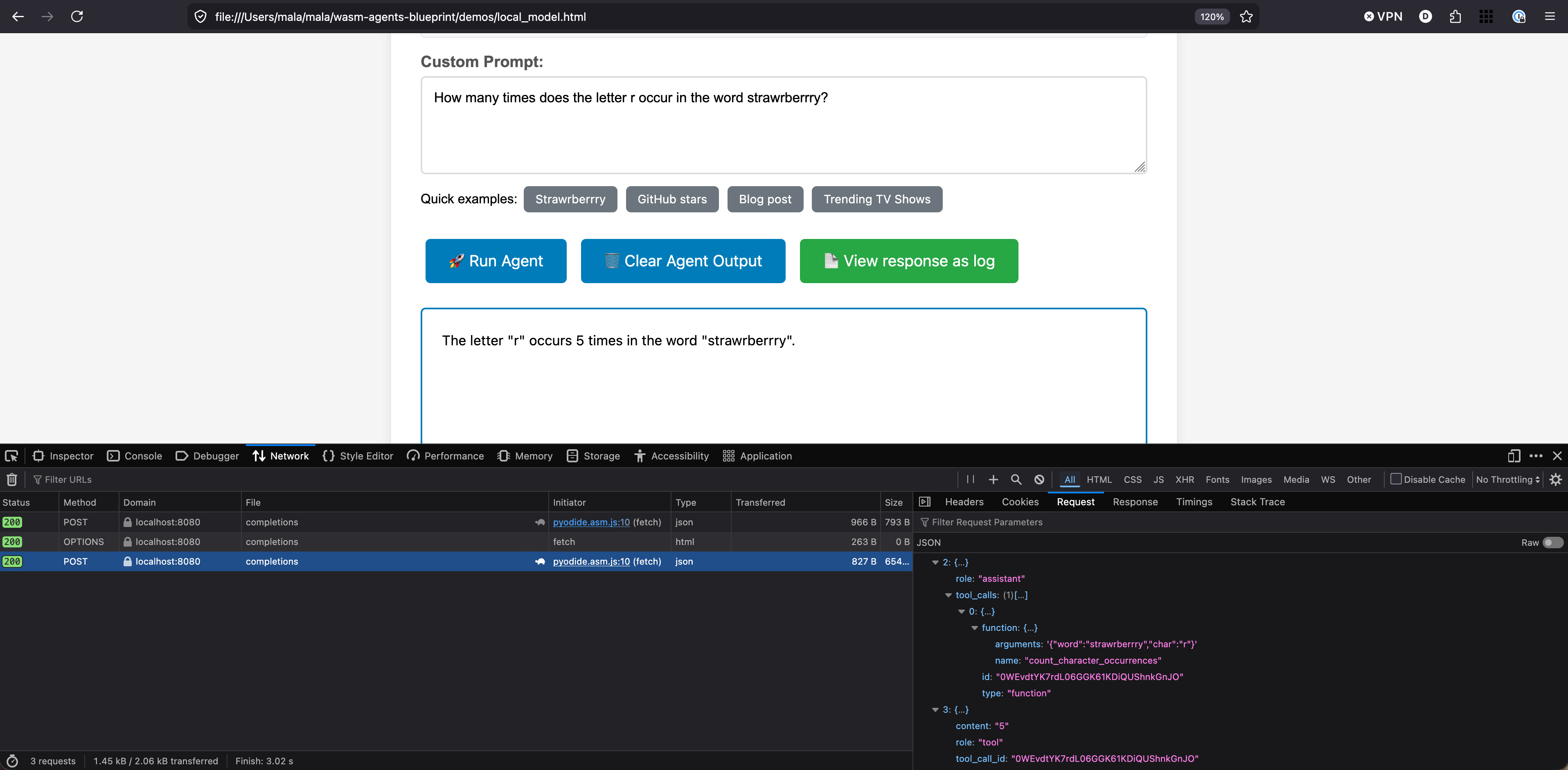
The interesting move here is that we have shifted what we trust. We are no longer trusting an LLM’s stochastic guess about how many Rs are in a word. We are trusting a piece of Python code that we wrote ourselves and can read. The LLM’s job is to decide when to call it, not to do the counting. For a brief moment last year, this setup with a local model gave more correct answers than GPT online — because GPT wasn’t reaching for a tool, and ours was.
(To be fair, a 9B model is overkill for this task. You can trigger the tool call with Qwen’s 0.8B model too, but I’ll show you later why, when looking for more determinism and control, it makes sense to be conservative with respect to model expressiveness.)
Context is all you need
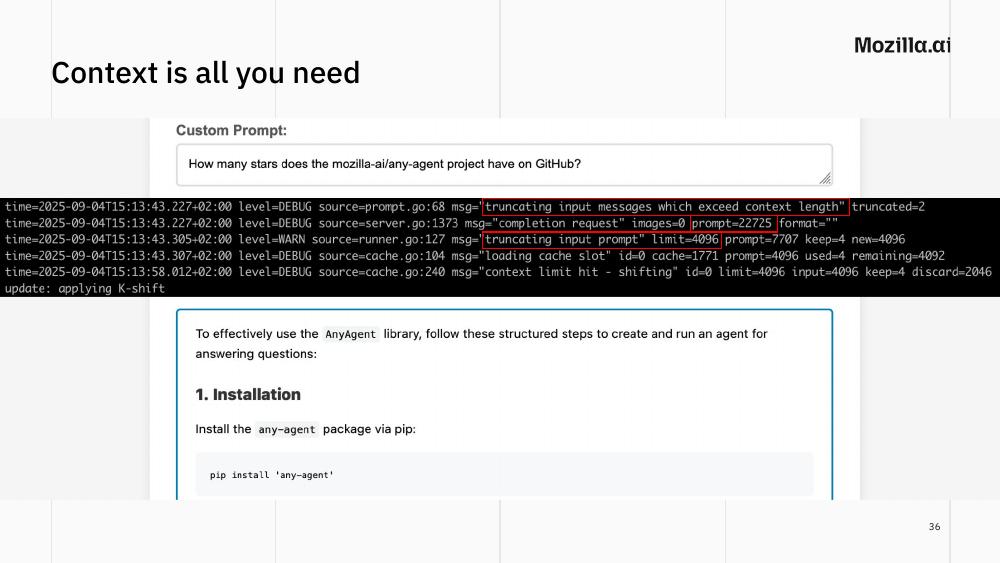
Here is a failure mode you usually only see if you read the logs. The user asks “how many stars does mozilla-ai/any-agent have on GitHub?”. The agent reaches for the web search and fetch tools. But the default context window in some local inference servers can be very small (as low as 4096 tokens, like when I ran this example with ollama a few months ago). A GitHub page can easily blow past that. The result: the server silently truncates the input prompt, the agent loses the original question and answers a completely different one, telling you how to install the any-agent library instead of how many stars the project has.
Two lessons:
- Always check the context size of your inference engine, and set it explicitly. Defaults can be tiny.
- Some tools fail loudly when they run out of context. Others fail quietly, by just… working worse. The quiet failure is the dangerous one, as it often makes you think your local model is just not capable enough.
Model expressiveness: same task, three models
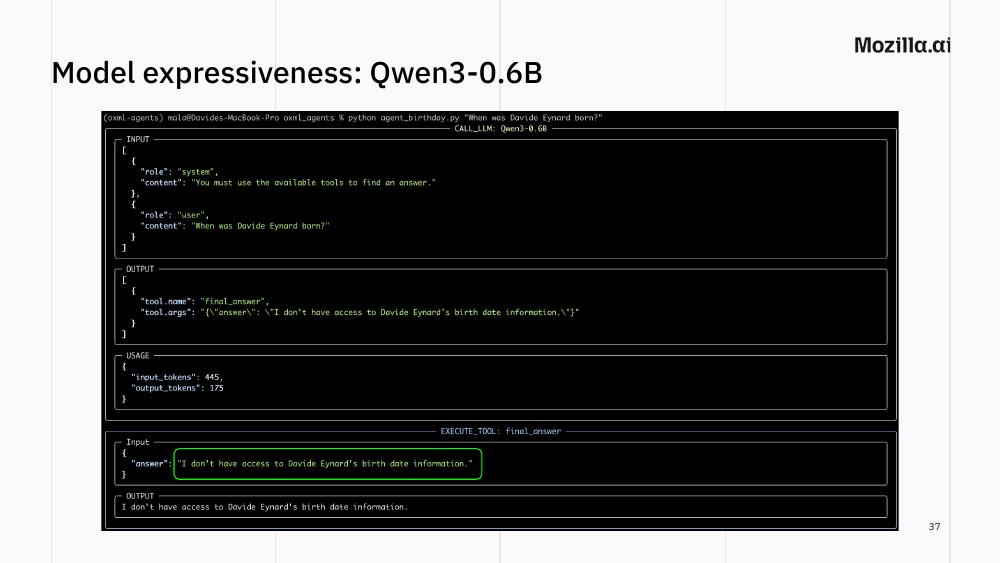
Let’s say you have configured your agent to use the proper context size for your task, and the tools that it needs to answer your question. What else can fail? Here we show one experiment where we test three models of different size (all from the Qwen family) with the same prompt: When was Davide Eynard born?.
Why my birthdate? Because it is not on any LLM’s training data (at least until now 😬), and is good to get a sense of the reasoning capabilities of different models. This allows us to show that:
even commercial AI models cannot answer the question straight out of their model weights. More expressive ones will at least tell you they don’t know, otherwise they will just straight-out hallucinate;
compared to them, local models provided with a
birthdays.csvfile on disk and two tools (scan_current_dirto find files matching a pattern, andread_fileto load a file’s contents) can do better;regardless of whether they are commercial services or local LLMs, when given the same identical tools, models of different sizes and expressiveness tackle the same problem in different ways.
Qwen3-0.6B, with no hint: ignores the tools entirely and replies “I don’t have access to Davide Eynard’s birth date information.” When run again, it hallucinates a confident, wrong date, providing a great example of how erratic the behavior of a stochastic model can be.
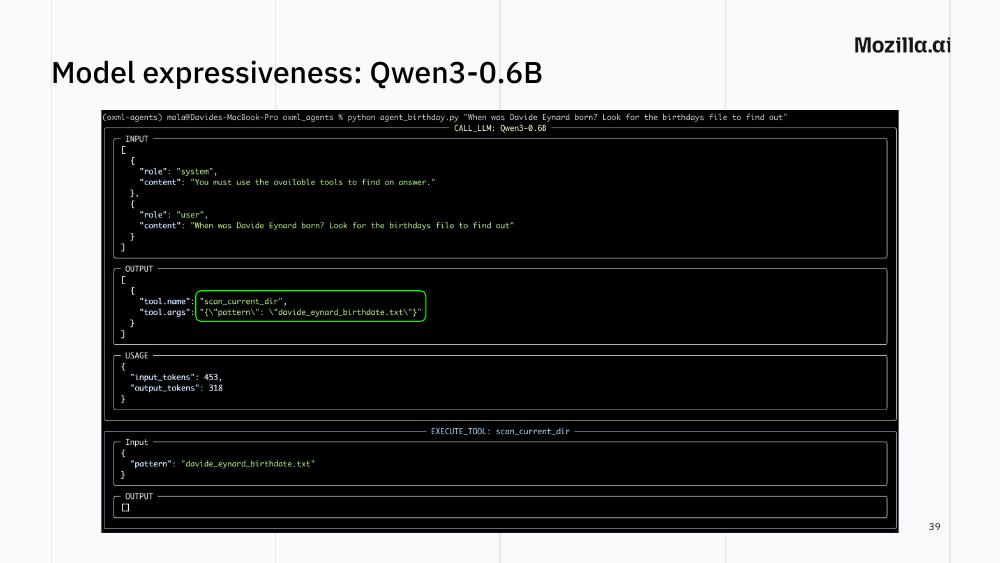
If you give the model a hint (e.g. “look for the birthdays file to find out”) it might call scan_current_dir with some made-up pattern (see the figure above). Give it a stronger hint (“look for the birthdays CSV file”) and it might finally get there: read_file("birthdays.csv"), gets back the contents, returns the correct date.
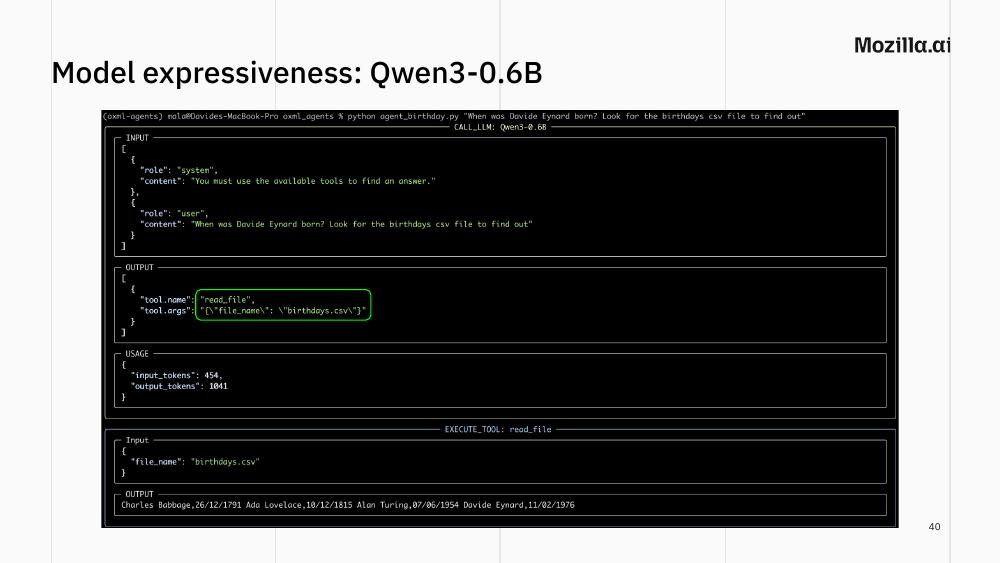
The lesson is not “Qwen3-0.6B is bad”. It’s that the agentic behaviour we take for granted with Claude or GPT — figuring out which tool to use without being told — is not free. It’s a function of model size and training. For a 0.6B model, you may need to tell it exactly which tool to use (and if you want an autonomous agent, well, Qwen3-0.6B might not the best choice for you).
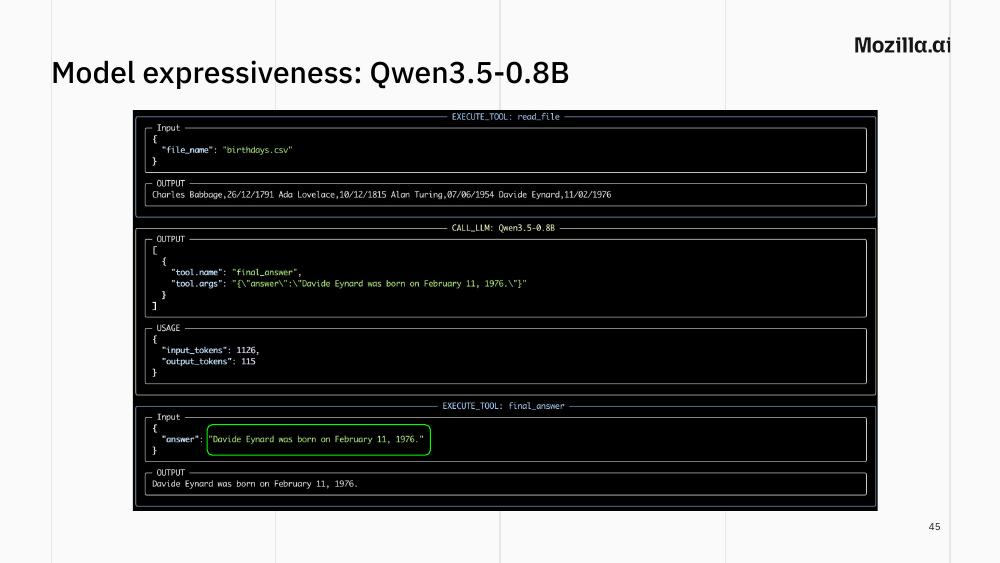
Qwen3.5-0.8B, only marginally bigger but six months newer: with the hint “look for birthdays on disk”, it tries .txt first, finds nothing, broadens to *birthday*, finds birthdays.csv and agent_birthday.py, picks the CSV (correctly judging it more likely to contain the answer), reads it, returns the date. A bit better, but it might still hallucinate tool calls from time to time, trying to bruteforce the filename it needs.
Qwen3.5-9B doesn’t need any hint. Tries *.md first, then * when it sees nothing was returned, finds the CSV, reads it, returns the answer. But here’s the interesting part: after running the experiment successfully with my birthdate, I deliberately put Alan Turing’s death date in the CSV and asked for his birth date. The 9B model first ignored the CSV information and just answered straight from its own knowledge. It knew Turing’s actual birthdate from training, and would not accept the CSV’s contradicting value. Only when I explicitly said “trust the tool’s answer” did it return the CSV’s date, with the qualifier “according to the birthdays.csv file”.
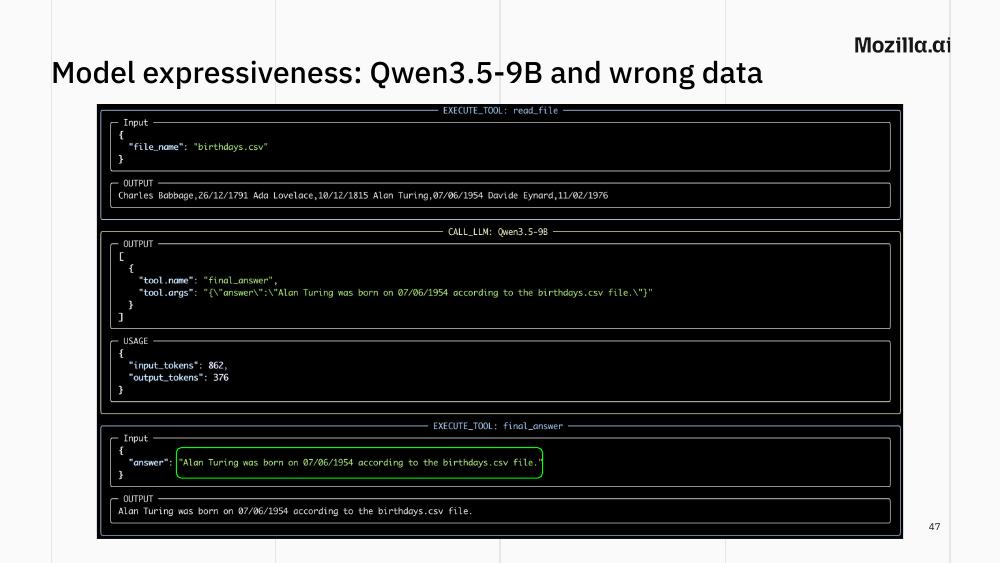
This is worth pausing on. A larger model has more knowledge baked in, which means there will be friction if inconsistent data is fed to it via tools. That’s a feature if your tool is buggy. It’s a bug if the person you’re asking about really does share a name with someone famous (say, your friend in the CSV file who happens to share the same name with Alan Turing), because the model might keep insisting on the “wrong” answer.
Overthinking: strawberry fields literally forever
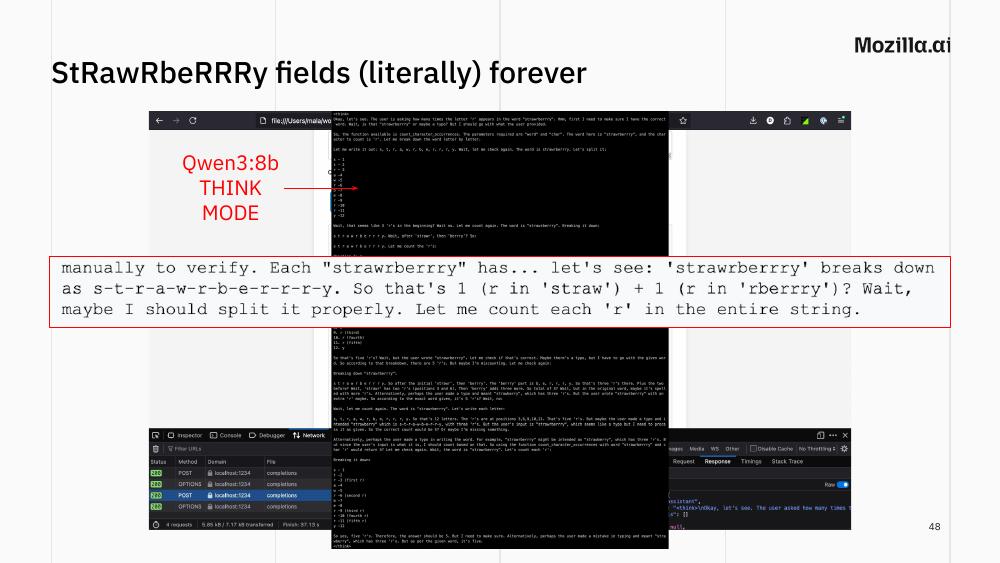
Some models are trained with a “think mode” that produces extensive internal reasoning before answering. Here is what Qwen3-8b in think mode did with our R-counting question: it spent most of a screen debating whether “strawrberrry” might be a typo for “strawberry”, whether there are three Rs or five, manually counting letter by letter, then second-guessing the count. The only reason it eventually gets to the right answer is that, eventually, it gives up reasoning and calls the tool.
Sometimes tools act as guardrails: even an overthinking model produces a correct answer if it ends up calling the tool, because the tool’s output is deterministic. The model has to decide to trust it.
Funny side note: something came out while I was reviewing the blog post draft Claude made from my slides + transcript. Trying to write down misspelled versions of “strawberry”, it misspelled both the original word and the wrong one I wrote.🙃
Who owns search capabilities?
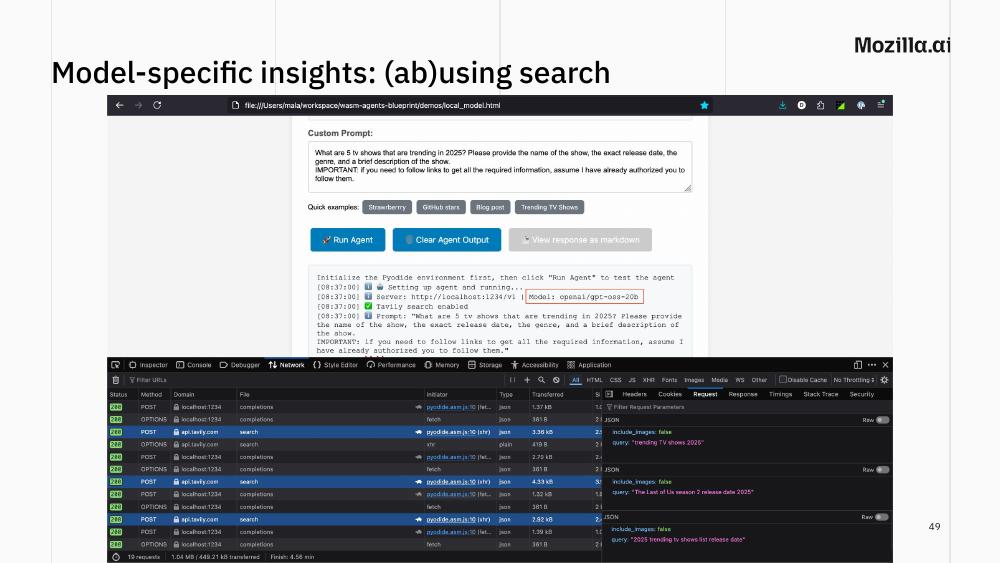
When GPT-OSS, OpenAI’s open-weights model, was released last year, I immediately started experimenting with it as a local model powering my wasm agents. I realised it had a very particular behavior I had not seen in previous models: if given a Web search tool, it searches the web compulsively. Asked for five trending TV shows in 2025, it first searches “trending TV shows 2025”, then for each show in the result it looks for more information about it, then again for any data it is still missing (e.g. a specific release date). Many searches for one question. On the one hand this looks good: think about “context is all you need”, what the LLM does is trying to avoid relying on its baked-in knowledge as much as possible. On the other hand, this makes me wonder what’s gonna happen when for every single question a person asks, an agent searches for its answer online… Also, “online” where?
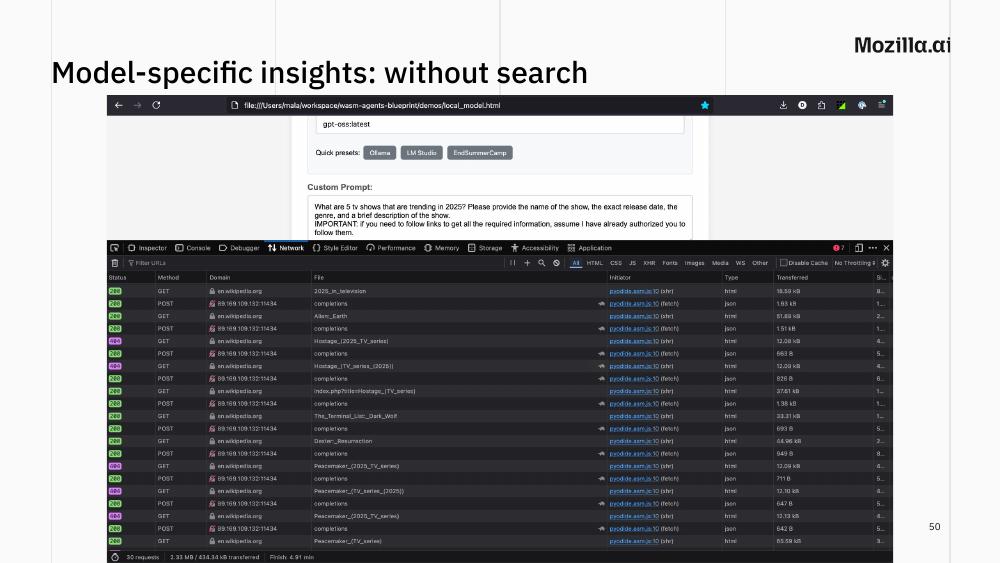
Take the search tool away and the model fetches Wikipedia pages directly. Some of the URLs it constructs are valid; many are 404s — it confidently invents page titles that don’t exist.
About a year ago, Wikipedia closed off non-browser user agents, what I think was at least partially a response to this kind of traffic. And the problem is not Wikipedia’s only: what happens to all those websites which are considered the official source of knowledge for a given topic? But even more importantly: we are lucky that the model redirects us to Wikipedia, a reputable source of knowledge; still, the choice is not ours, and as it’s baked into the model weights, we have no way to change this default behavior aside from circumventing it.
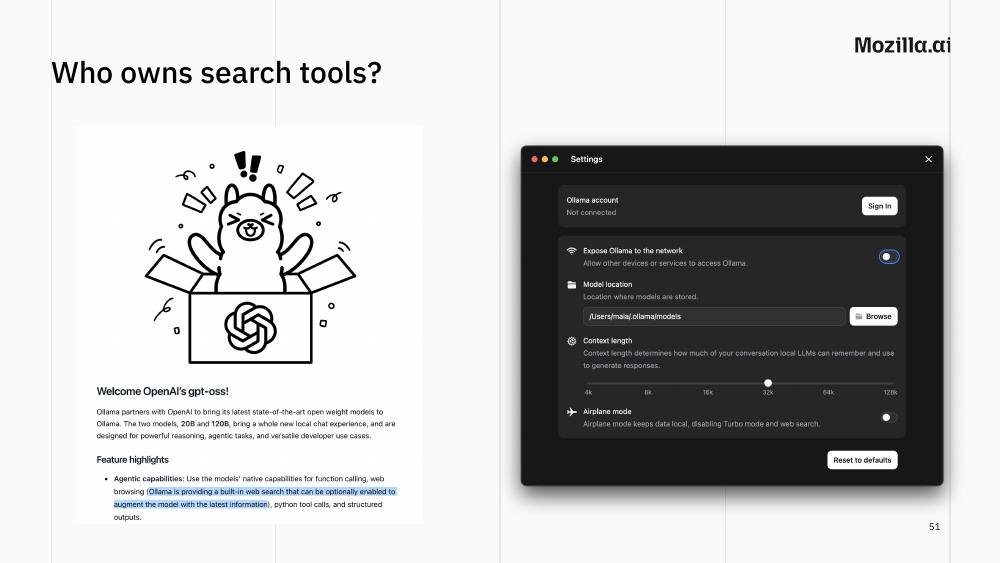
And then there’s the question of who owns the search tool itself. When Ollama released GPT-OSS support, they added a built-in web search. The search endpoint was opaque (the relevant code wasn’t open source) so you couldn’t see where your queries were going. The open source tool was becoming less and less open, and the “local” inference server now had an “airplane mode” toggle, off by default.
This is the point at which philosophical questions about ownership become concrete: who is in the room with you when you run a local model that does web search?
What if search is your tool?
A more hopeful experiment. SearXNG is a free meta-search engine that aggregates results from many providers (Google, Wikipedia, Startpage, and many others) without keeping logs of your queries. You can run it locally: I run my instance as a Docker image, on a Raspberry Pi. Combined with a small local model and the pi agent framework as a host, you get an agent that does web search where you are in the room. Of course, you don’t own the search engines you call. But you can see exactly which upstream services were called, you control which ones are enabled, and your queries don’t get logged for ads.
There are many different ways to run agentic search: the wasm-agents example showed Tavily, which is a third-party API; some tools rely on headless (or actual) browsers and fill forms and hit Search for you; SearXNG aggregates data for you and provides it via a single API. There are also different ways you can run your agent: I repeated the same experiment with wasm-agents and mcpd, pi, and as a python script with any-agent.
What is the best solution? I loved the pi+searxng+llamafile (with Qwen3.6-27B) combination, but I think this can be very subjective depending on your needs and compute. The important thing is always being able to choose what code you run and where.
Wikipedia itself as your tool
Before we discussed hammering Wikipedia with requests. What if we had a tool to search Wikipedia offline?
The Kiwix project distributes the entire Wikipedia in a single, self-contained file in a format called ZIM. The full version without images is around 50 GB; but you can get more heavily trimmed-down versions for around 10–15 GB, or just the text of the top 45K best articles in less than 2GB. Libraries to parse and search ZIM files are widely available, so making them available to agents is not too difficult. With this setup, the “when was X born?” question can be answered offline in a more deterministic way, with a small model, on a laptop… Together with many other ones.
Building a small knowledge base
The other extreme is your own data. I keep notes in Joplin, because it is an amazing, open source note taking tool that resisted enshittification and just works. In addition to that, it also has an API to access it programmatically. I built a small wiki about the llamafile project I work on, then asked a 9B local model with read access to those notes to summarize the main GPU-acceleration issues I’d worked on. The output was a good summary, with sections matching the documentation I’d actually written.
The idea of building a personal “wiki” populated by an LLM reading and restructuring your existing notes comes from a recent gist by Andrej Karpathy. The point is that, while building from scratch or maintaining such a wiki might require some level of expressiveness, you do not need a state-of-the-art model to do useful retrieval over a few hundred of your own notes. A small local model and a few tools can often be enough.
A new problem: stalking agents
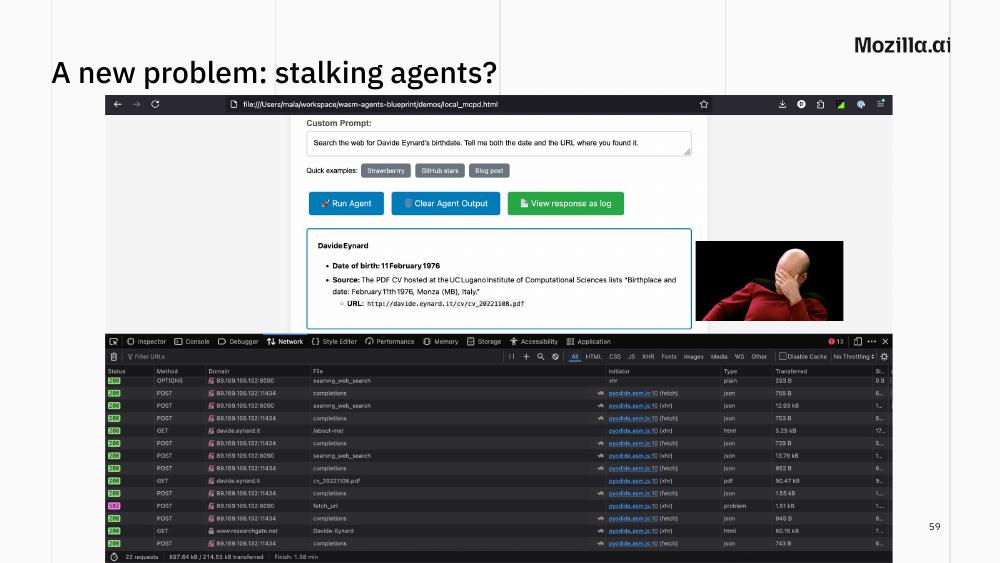
One last experiment, half-joke and half-warning. I asked an agent to search the web for my birthdate and report both the date and the URL where it found it. The agent eventually located the right answer in a PDF CV hosted on the University of Lugano website.
I’m fine with that (I put the CV online and left it there myself). But pause and consider: an agent that never gets tired, never stops searching, can correlate scraps of personal information across many sites in a way that nobody would have the patience to do by hand. The technology that lets you build a local agent for benign tasks lets anyone build one for surveillance. This is not a reason not to build agents. It is a reason to think carefully about what tools you give them and, more generally, what you share publicly.
Learnings
To compress everything above into something portable:
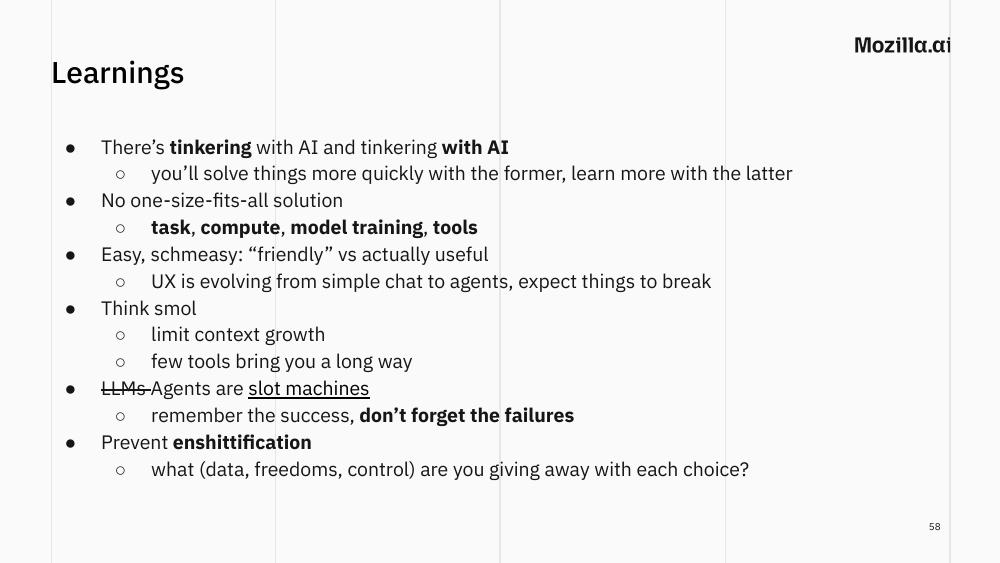
- There’s tinkering with AI and there’s tinkering with AI. You’ll solve problems more quickly using AI as a tool. You’ll learn more when AI is the object of your tinkering. Both are fine. Be deliberate about which one you’re doing.
- No one-size-fits-all solution. The right setup depends on your task, your compute, your model’s training, and the tools you need. There is no answer to “which model should I use?” without those four pieces of context.
- Easy isn’t useful. Friendly UX is evolving fast and breaks often. What might be best for most (a server that uses the smallest possible context size to run on everyone’s hardware) might not be ideal for you (a tinkerer willing to create new agents). Sometimes the bottom-up route, building from primitives, is the route that pays off long-term.
- Think small. Limit context growth. A handful of well-chosen tools goes a very long way. What I find most mindblowing lately is not that claude code can… code (think about how much extra engineering is behind that service!), but that a 4B parameters multimodal LLM can properly categorize my photos without any extra tool, or how deep a local model can go when using just two tools: search and fetch_webpage.
- Agents are slot machines. We remember the times they worked and forget the times they didn’t. Try to tune them so the success rate is high enough to stop being a gamble, and have realistic expectations when it isn’t.
- Prevent enshittification. With every choice — every tool, every model, every library — ask what data, freedoms, and control you’re giving away. Especially for the tools that look free.
Where to go from here
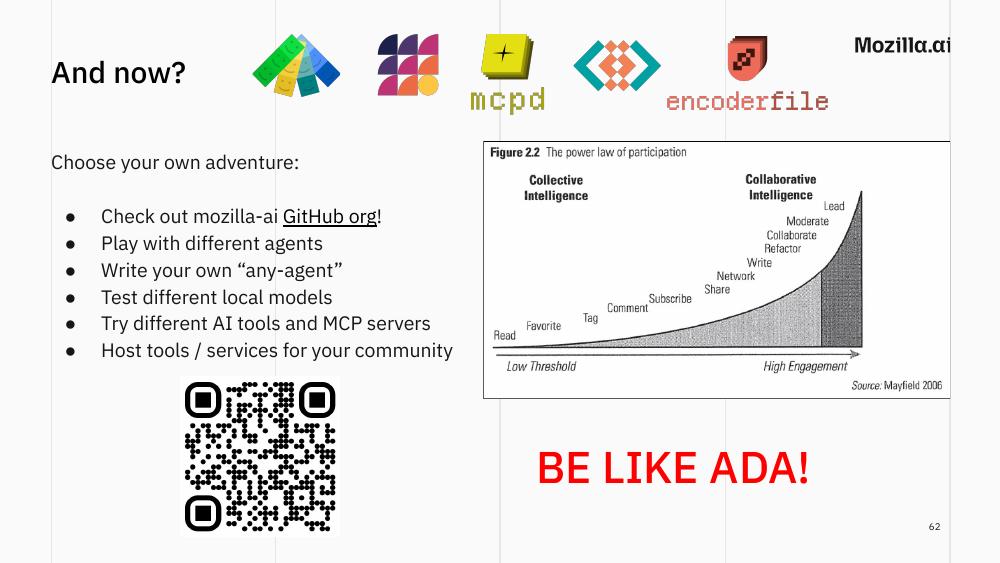
It’s been a while now since I started showing this “power law of participation” image in the last slide of my talks. The picture is 20 years old this year but I still find it very actual. It basically tells you in how many different ways participation takes place in a collaborative system.
So, following the power law (from lowest to highest effort), here are some concrete next steps if any of this resonated:
- Check out the mozilla-ai GitHub organisation.
- Play with different agents — ours or other people’s, doesn’t matter as long as they’re open source!
- Try writing your own “any-agent”, in any language (or have an agent write it for you 🙃).
- Test different local models against the same task. The differences are educational.
- Try different tools, from agentic harnesses to MCP servers (or alternative ways to MCP to run tools!)
- Host a tool or service for your community.
… Or do none of those. The point of this post isn’t a to-do list. The point is to give you enough scaffolding to look at any agent, whether it is Claude Code, an opensource agentic harness, or a python script, and know exactly which of the five primitives you’re looking at, where the context comes from, where it goes, and who is in the room with you.
Be like Ada.