Own your AI agent: running open source agents on your terms (2/3)
Based on a lecture given with David de la Iglesia Castro in early May 2026.
What you are reading is the written version of a lecture David and I gave on building and running AI agents that you own completely. It starts from the assumption that even if a commercial AI service is not inherently bad, depending on one for everything definitely is. After providing a way to compare commercial and open source AI systems more fairly, we walk through the primitives that every modern agent is built from. With a series of concrete experiments with local models and tools, we explain how open source agents work and where they fail. The argument throughout is that you don’t have to depend on closed, rented systems for everything — and that you learn a lot more when you don’t.
Given the length of the lecture I decided to split this post in three parts. You are currently reading the second one. Part 1 provides an introduction with motivations and background, this post walks you through the five primitives that most modern agents are built from, and part 3 presents a series of concrete experiments with local models and tools.
Every agent is the same five things
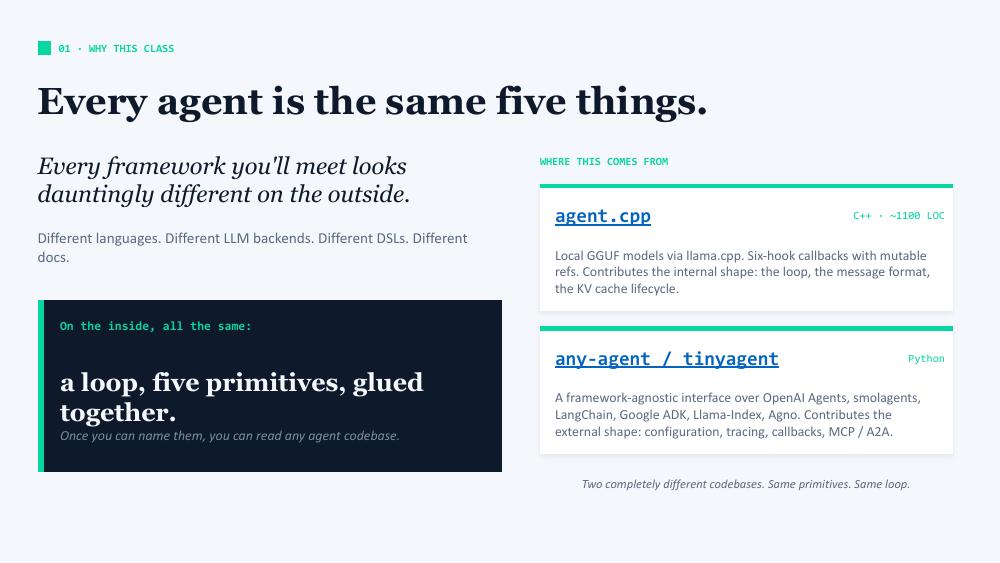
This post comes from David de la Iglesia Castro’s part of the talk, based on two projects developed at Mozilla.ai: agent.cpp (a ~1100-line C++ runner using local GGUF models via llama.cpp) and any-agent, a Python framework-agnostic interface over OpenAI Agents, smolagents, LangChain, Google ADK, LlamaIndex, Agno, and TinyAgent, Mozilla-ai’s own tiny library.
These two completely different codebases, as well as all the libraries and tools we studied to develop them, eventually boil down to the same few primitives and a while loop. In particular our TinyAgent, inspired by Julien Chaumond’s Tiny Agents post, was kind of revealing to us: it showed that something as simple as 400 lines of Python was more than enough to build an agentic system around it, if you have the right components.
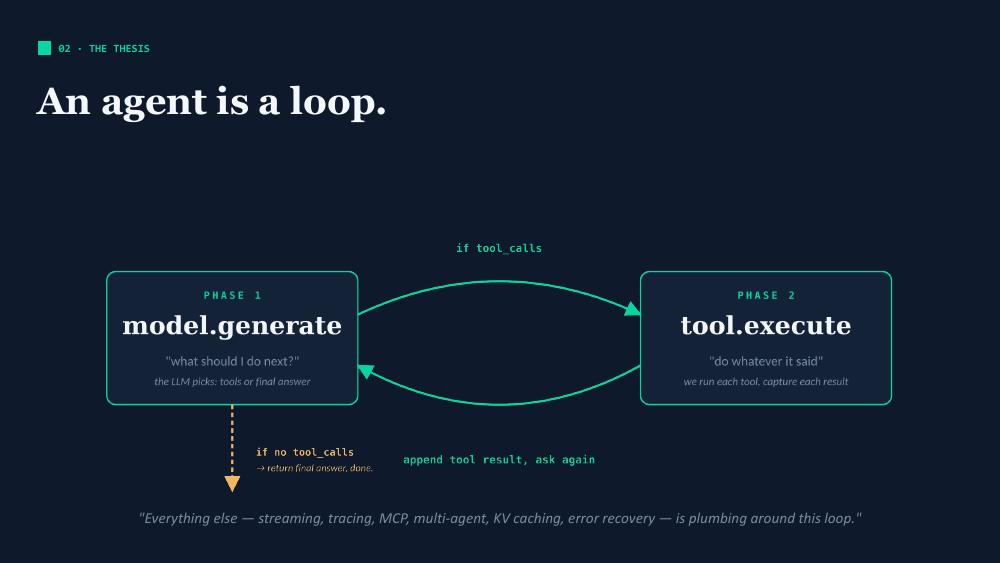
The whole thing reduces to two alternating phases:
model.generate— the LLM looks at the conversation so far plus the tool catalogue, and decides what to do next. It either calls one or more tools, or it produces a final answer.tool.execute— if the model called tools, we (the runtime, not the model) execute them and append the results to the conversation.
Loop until the model emits no tool calls. Everything else (e.g. streaming, tracing, MCP, multi-agent, KV caching, error recovery), is plumbing around this loop.
The five primitives
These are the primitives that build up basically every agent:
- Model: an assistant that takes your messages and the available tools and returns the next message.
- Tools: named, typed, callable functions the model is allowed to invoke.
- Instructions: the system prompt, that tells the model who it is and what it is being used for.
- Callbacks: functions that are hooked in strategic parts of the pipeline, actig as lifecycle observers but also as rewriters of what flows through the loop.
- Loop: the engine that drives the alternation of model and tool calls, until the model stops.
Names vary across frameworks. Semantics don’t. Once you can name these five things, you can read most agent codebases.
Primitive 1: Model
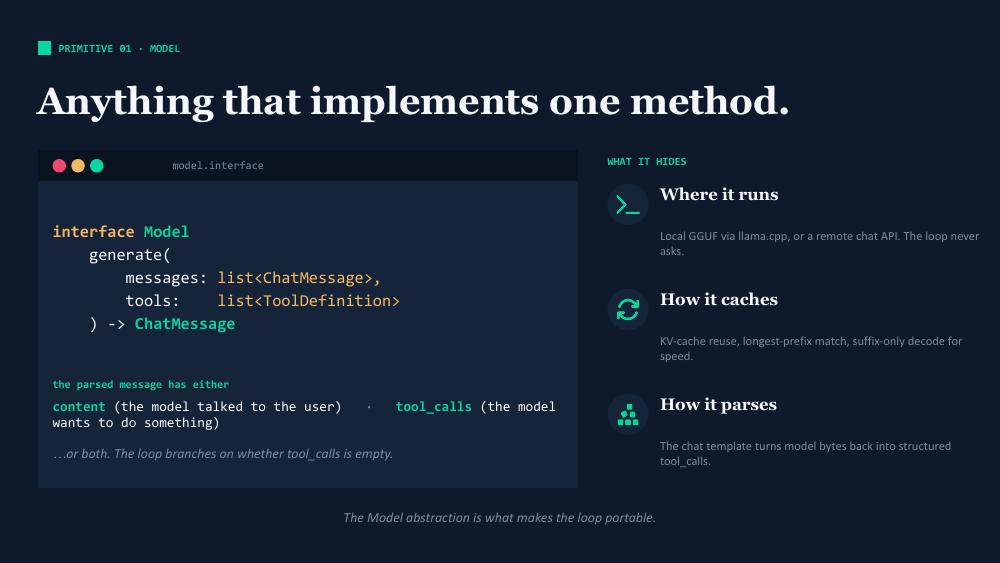
A model is anything that implements one method: given a list of messages and a list of tool definitions, return the next assistant message. The returned message contains content (text for the user), or tool calls (structured requests to invoke tools), or both.
The model abstraction is what makes the loop portable. The loop doesn’t know whether the model runs locally via llama.cpp on a GGUF file or remotely via the OpenAI API. It doesn’t know how the chat template is rendered, or how the KV cache is reused. All of that is hidden behind the interface.
Primitive 2: Tools
A tool is three things, always:
- A name: a stable identifier that the model emits when it wants to invoke this tool.
- A definition: a free-form description (the model uses it to decide when to call the tool) plus a JSON Schema for the arguments.
- An execute function: the actual code that runs when the tool is invoked.
It’s worth being precise about how this works: the model cannot directly call your code. The model emits a JSON object saying “I would like to call the tool named X with these arguments”. Your runtime parses that JSON, validates it against the schema, dispatches to your function, captures the return value, and feeds it back into the conversation as a tool message. The model then sees the result on the next iteration.
Primitive 3: Instructions
The simplest primitive: it is just a string (the system prompt). It goes first in the message list, and it tells the model who it is and how to behave. There are newer-sounding paradigms (skills, etc.) that look more complicated, but at the end of the day they’re all instructions: clever ways of loading the right text into context at the right time without overwhelming the model.
Primitive 4: Callbacks
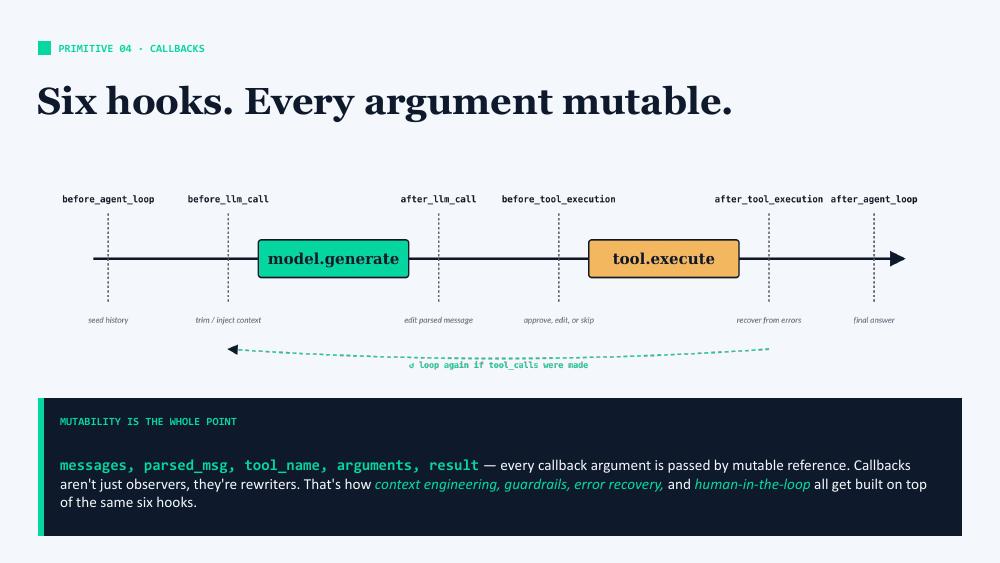
There are six points in the loop where callbacks fire. Here they are, with some example related tasks:
before_agent_loop: seed the loop with some previous history / custom contextbefore_llm_call: trim or inject context before the model runs (e.g. run guardrails to prevent prompt injection)after_llm_call: check / edit the LLM response (e.g. verify no tool hallucinations, apply guardrails to response before it reaches the user)before_tool_execution: put human in the loop to approve, edit, or skip the tool callafter_tool_execution: recover from errorsafter_agent_loop: prepare the final answer
The crucial design choice is that every callback argument is passed by mutable reference. Callbacks aren’t just observers — they’re rewriters. This is what makes the same six hooks powerful enough to implement all of the following:
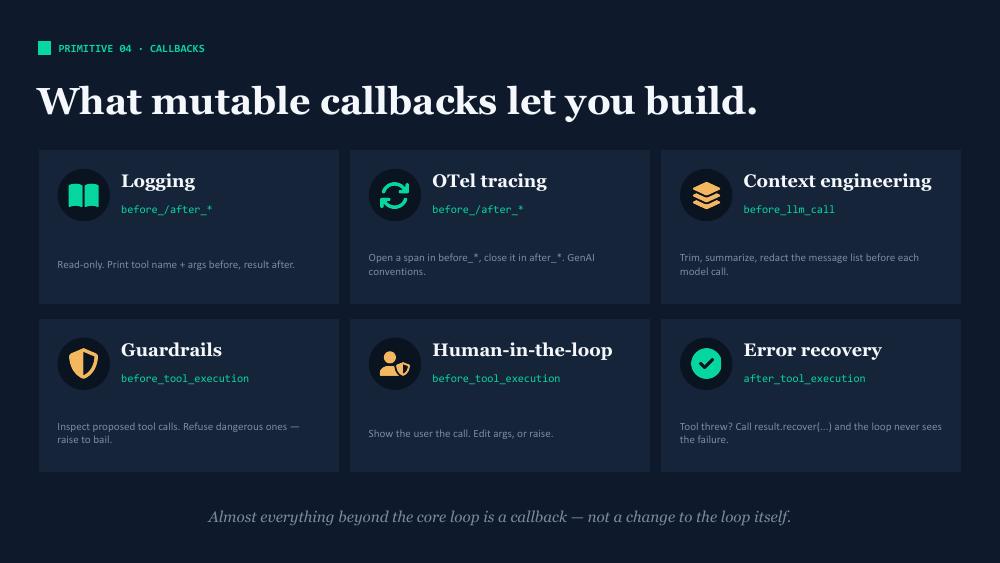
- Logging and tracing: read-only before/after pairs
- Context engineering: trim or summarize the message list before each model call
- Guardrails: inspect proposed tool calls, refuse dangerous ones
- Human-in-the-loop: show the user the proposed call, edit args, or skip
- Error recovery: turn tool exceptions into recoverable data
Almost everything beyond the core loop is a callback, not a change to the loop itself.
Primitive 5: The loop
This is how the agentic loop looks like in pseudocode:
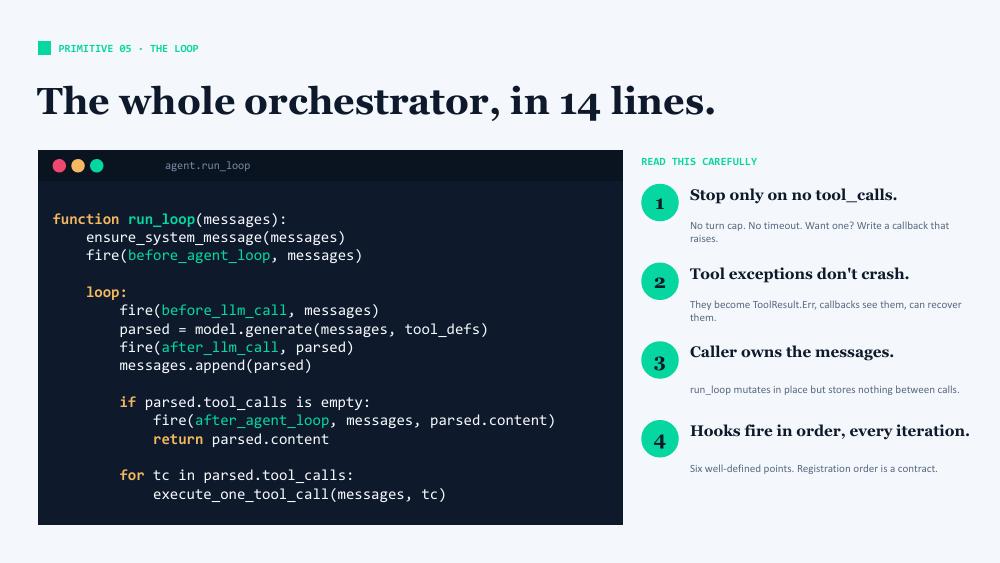
A few things worth noting:
- The loop stops only when there are no more tool calls. This pseudocode has no built-in turn cap or timeout, but you can implement one as a callback if you want.
- Tool exceptions don’t crash the loop: they become tool results with error content, the model sees them on the next iteration, and gets a chance to automatically recover from them.
- The caller owns the messages list.
run_loopmutates it in place but stores no state between invocations. It could, of course: suppose you wanted to be able to rollback to a previous moment in your conversation, you could do that if you storedmessagesat different moments in time. - Hooks fire in a fixed order, at every iteration.
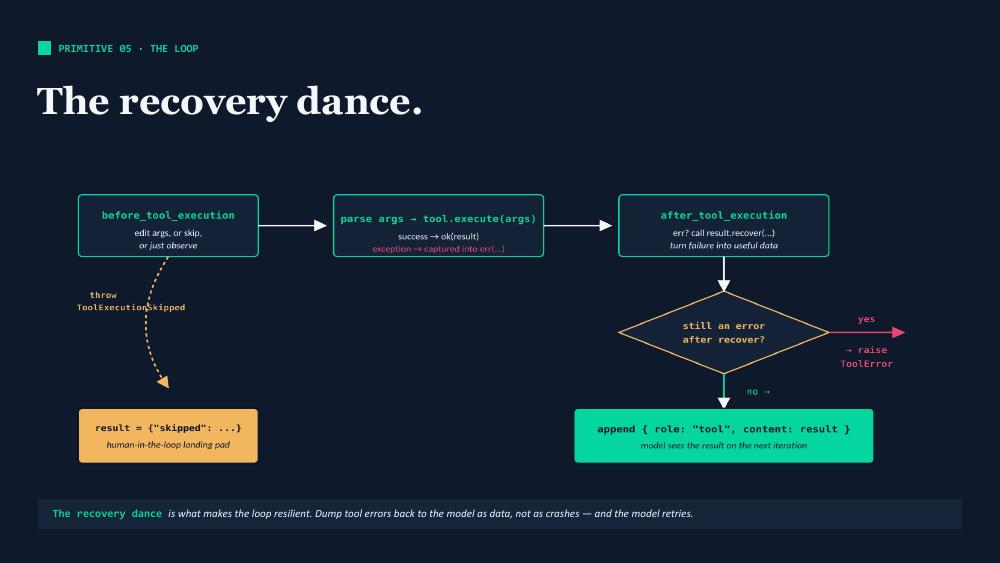
The way the loop handles tool errors is worth lingering on, because it’s what makes agents resilient. If a tool throws, the exception is captured into an error result. The after_tool_execution callback gets a chance to recover (e.g., retry with different arguments). If the error is still there after recovery, the loop raises. Otherwise, the error is appended to the conversation as a tool result and the model sees it on the next iteration — typically the model then adjusts and tries again.
The principle: dump errors back to the model as data, not as crashes. The loop does not break from the failure.
What about real systems?
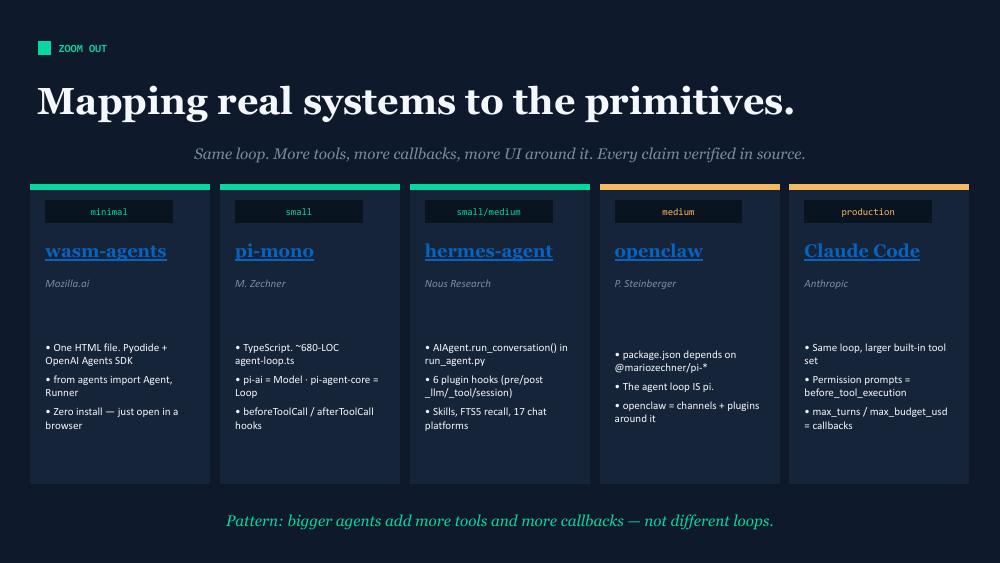
This same five-primitive structure shows up everywhere. Mozilla’s agent.cpp, tinyagent, and wasm-agents (which is based on the OpenAI Agents SDK). Mariozech’s pi-mono. Nous Research’s hermes-agent. Steinberger’s openclaw (which is based on pi). Anthropic’s Claude Code itself. Same loop. Bigger agents just add more tools and more callbacks — they don’t change the loop.
A worked example: memory as three tools
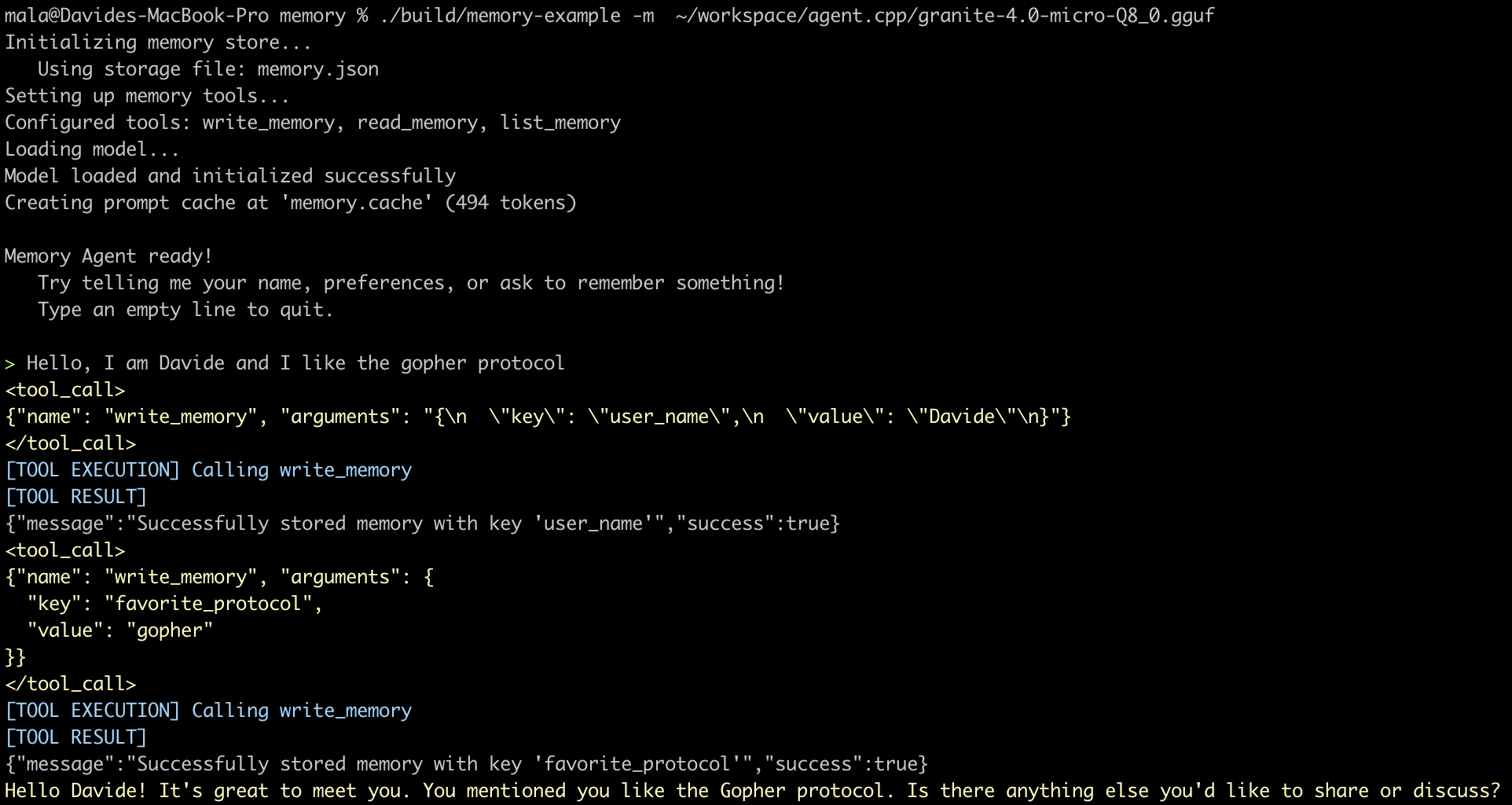
To show the primitives working together in practice, agent.cpp provides a complete memory-enabled agent example:
- the model is IBM’s granite-4.0-micro, a 3B parameters model, small enough to run in quantized format on most modern hardware (the Q8 version takes ~7GB RAM at full context size), even without GPU acceleration
- three tools are exposed:
write_memory(to save a memory as a key-value pair),read_memory(to load a saved memory given a key), andlist_memories(to list all the currently stored keys) - the instructions tell the assistant that memory is available about the user, and how to use the different tools
- no callbacks are implemented in this specific example (but you can find them in other examples, e.g. the context-engineering one)
- the loop is the one implemented in agent.cpp
When the agent starts a fresh conversation, it calls list_memories, sees what’s stored, and decides whether to read anything. When the user shares a new fact (“I love Galician cuisine”, or as in the example below: “I like the gopher protocol”), the agent calls write_memory to persist it. The memory itself is just a JSON file on disk — it could equally be a database or a remote service.
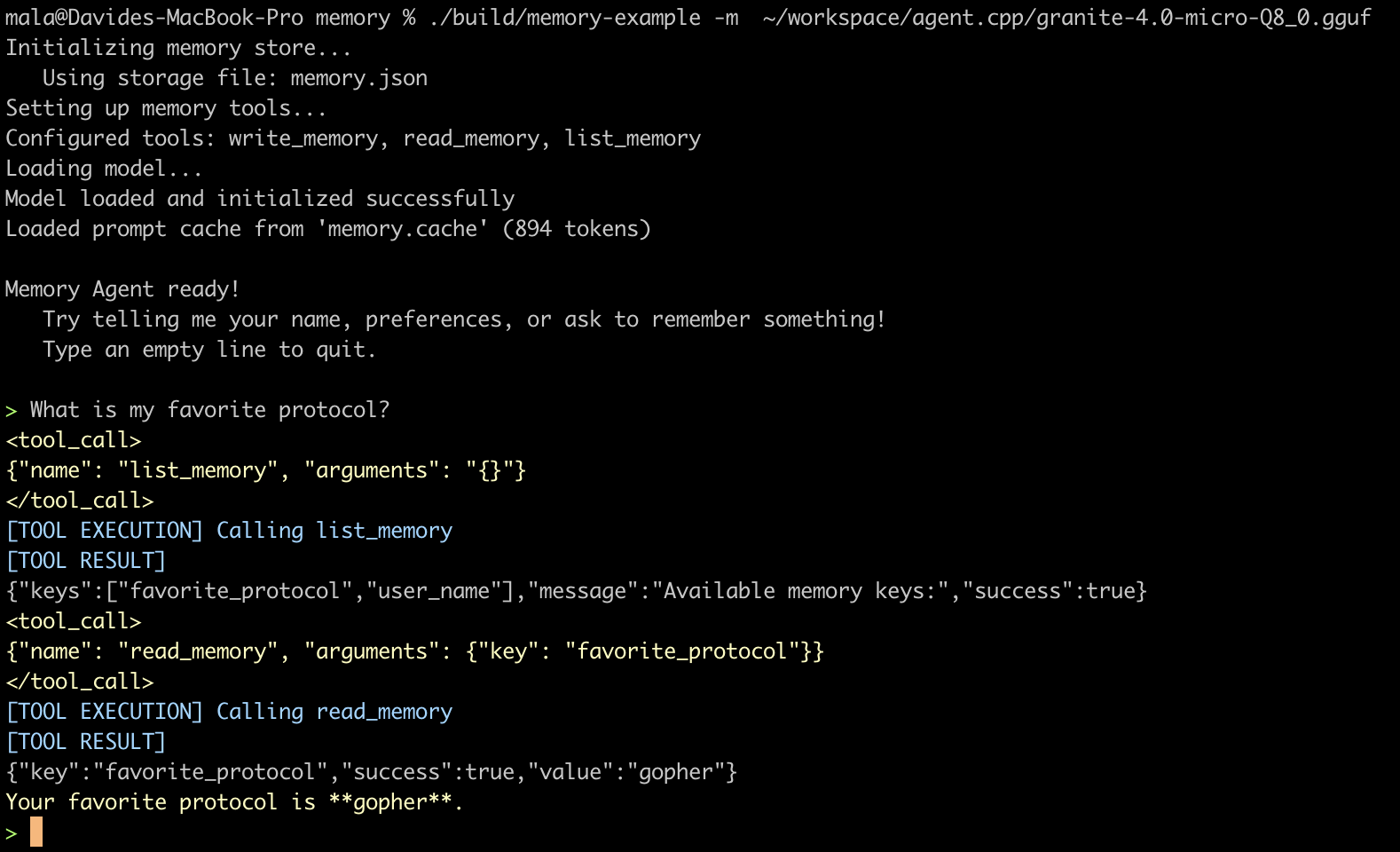
Once you have this skeleton, you can see how memory might evolve: instead of three tools the agent has to remember to use, you could write a before_llm_call callback that automatically reads all memories and injects them into the context. Both implementations are reasonable; the right choice depends on your model and your token budget. The point is that you can see the choice clearly, because the primitives are apparent to you.